You can now create multiple watchlists on Bulios. Keep your stocks in focus

Stocks organized into lists by sector, strategy, or idea. Each watchlist has its own name, icon, view, and change history.

If you follow twenty or fifty stocks in a single list, eventually you’ll stop being able to find your way around it. Dividend companies get mixed in with growth stocks, stocks you already own with those you’re still waiting to buy, and a new idea gets lost among stocks you’ve followed for years. That’s why you can now create multiple watchlists on Bulios, such as Semiconductors, Dividends, and Waiting for a Better Price, each with its own name, icon, and color. When you click Follow on a stock, you’ll be asked which list it belongs in, and each list remembers how you want to view it: dividend stocks by yield, growth stocks by revenue. When you open a watchlist, you’ll see only the stocks that belong together, along with the figures you use to make decisions.
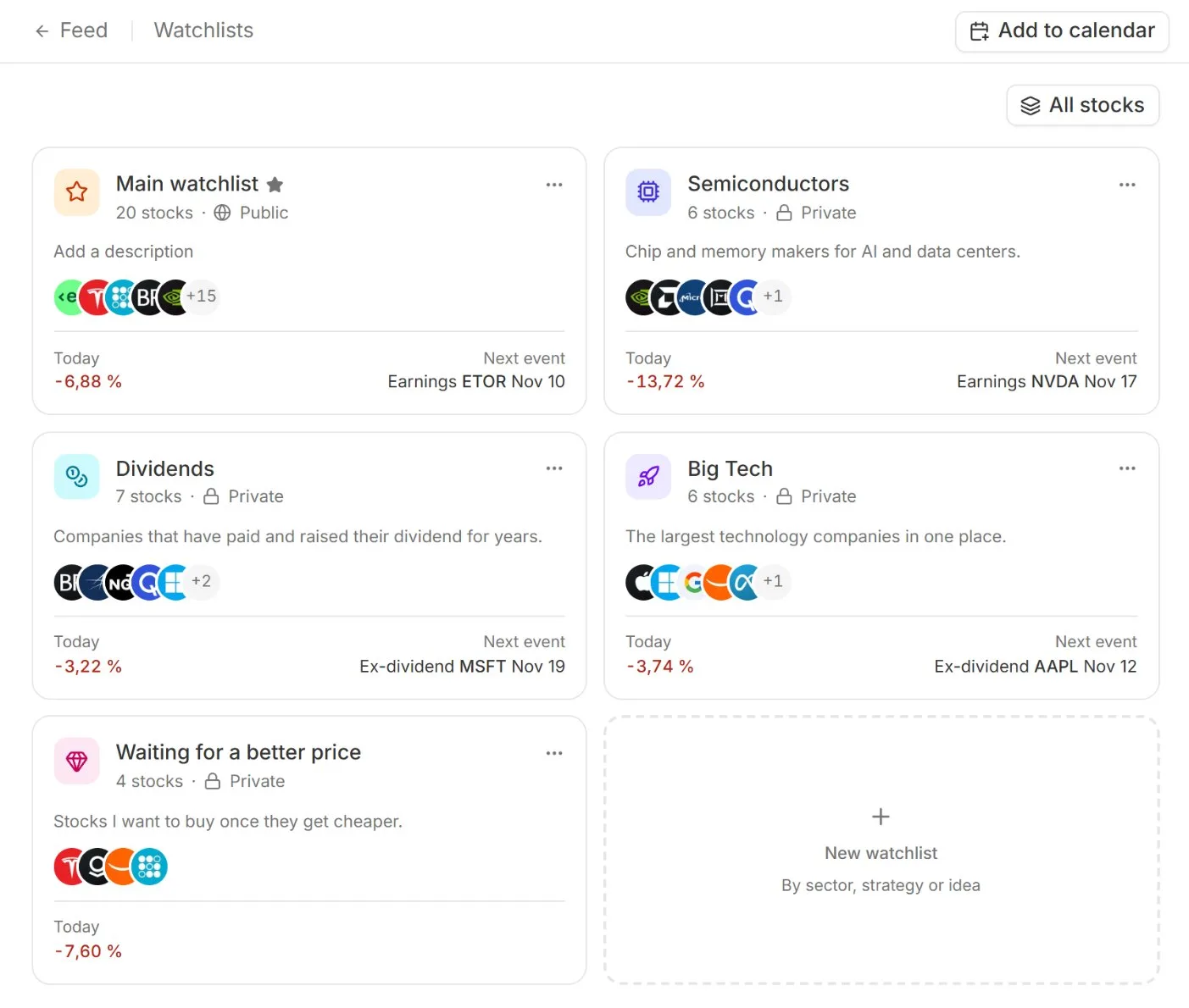
Watchlists page: each list is a card with the number of stocks, today’s change, and the next upcoming event.
Each list has a name, icon, and its own card
The Watchlists page displays all your lists as cards side by side. Each card shows the name, icon, and color you chose, the number of stocks, the logos of the first few, today’s change, and the next upcoming event—an earnings report or ex-dividend date for one of the stocks on the list. Drag and drop the cards to arrange them in the order you open them most often. One list is your main watchlist, marked by a star next to its name, and you choose which one it is. The All stocks button at the top combines all your lists into one, if you’d rather see them together.
What the new watchlists can do:
Multiple lists. Organize them by sector, strategy, or idea, each with a name, description, icon, and color.
Follow with list selection. The Follow button on a stock shows your watchlists. A stock can be on more than one list.
Eleven views. Overview, Waiting for a Price, Valuation, Dividends, Growth, Quality & Balance Sheet, Price & Volatility, Analysts, Earnings, News & Content, Funds & ETFs.
Cards above the list. Stocks with the highest yields, upcoming earnings, stocks closest to a price alert, and other details based on the selected view.
Change history. When you added or removed a stock, at what price, and how it has moved since. Add a comment to each change.
Private or public. Only you can see a new list. A public one appears on your profile.
Follow asks which list a stock belongs in
Every stock on Bulios has a Follow button. If you have one watchlist, it works as before, with a single click. Once you have multiple lists, it opens a menu of your watchlists, and you can check which ones the stock belongs in. Nvidia can be on both Semiconductors and Big Tech, for example. You can also create a new watchlist from the same menu, and the stock will be added to it right away. After adding it, you’ll see a confirmation with the list’s name and an option to add a note explaining why you added the stock.
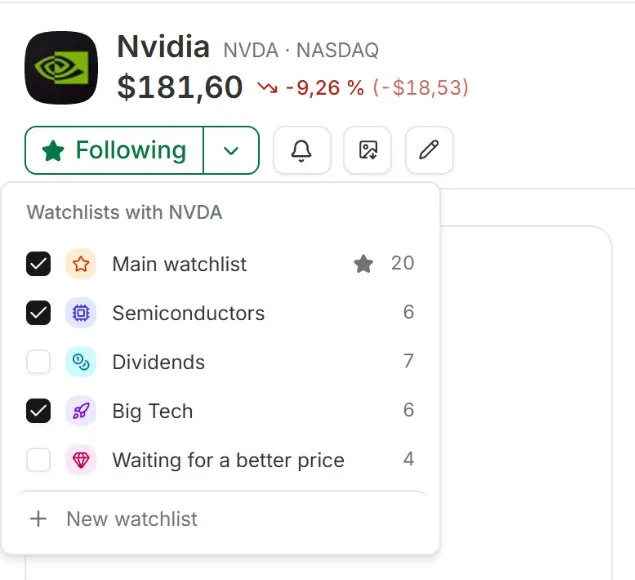
Follow button: select the lists a stock belongs in, or create a new one right away.
Eleven views, each list remembers its own
You assess a dividend stock by its yield and payout safety, and a growth stock by its revenue and margins. That’s why each watchlist has a View selector with eleven ways to look at the same stocks: from Overview, with price, monthly performance, and the next upcoming event, through Valuation, Dividends, Growth, Quality & Balance Sheet, and Analysts, to News & Content, where you can see the latest flash news, Bulios analysis, and community posts for each stock. Each list remembers the view you chose, so Dividends always opens in the Dividends view and Semiconductors in Growth. Above the table are cards highlighting what matters in the list right now, such as the stocks with the highest yields, the number of safe dividends, or the next ex-dividend date. Click a card and the table will show you the stocks it relates to.
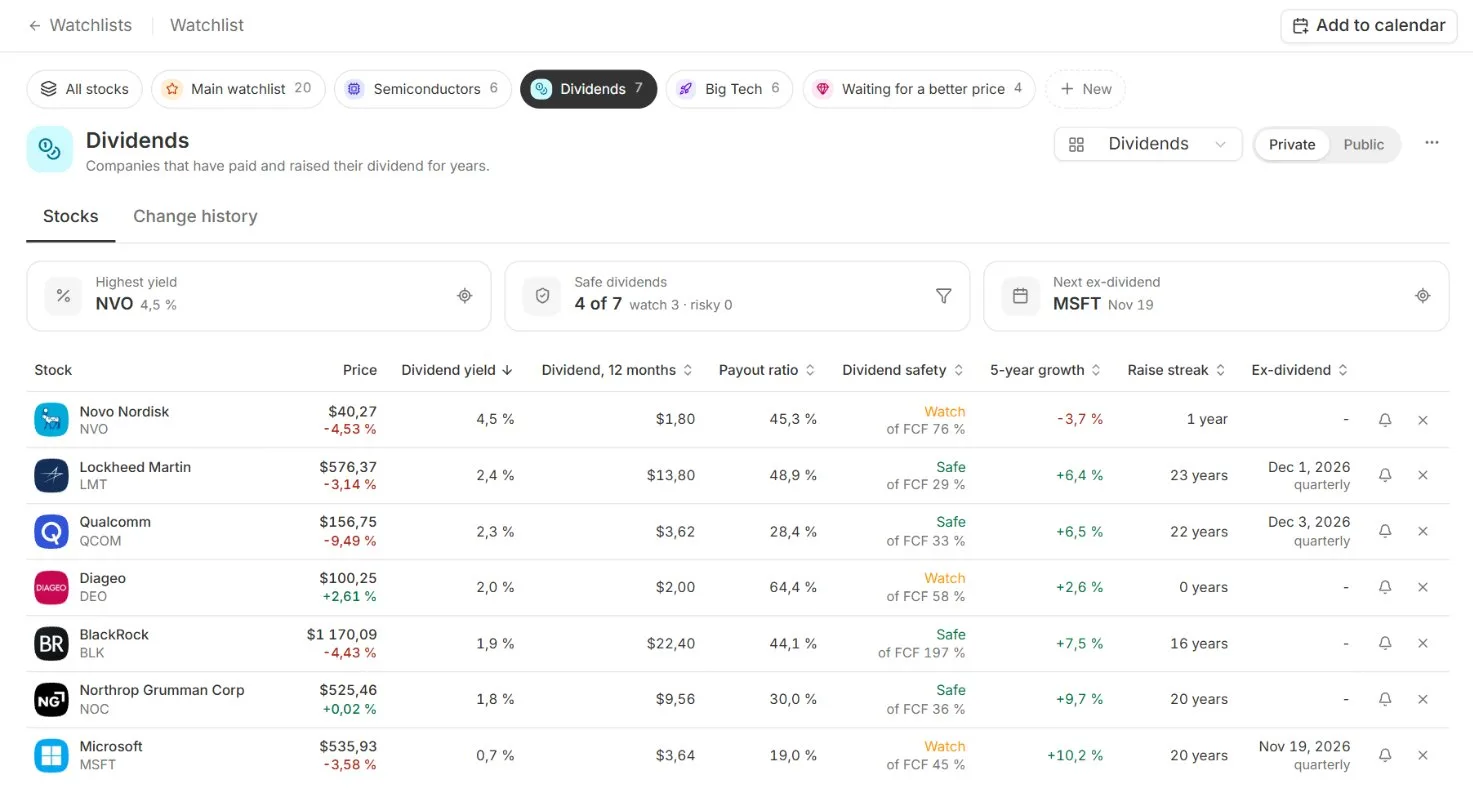
Watchlist in the Dividends view: cards at the top show the highest yields, safe dividends, and next ex-dividend dates.
Change history: when, at what price, and why
Each watchlist keeps a history. It records the date you added or removed a stock, the stock’s closing price on the last trading day, and how much it has moved since. You can add a comment to each change, such as “waiting for a better price after earnings.” That way, six months later, you won’t have to wonder why you picked the company at the time, and you’ll be able to see whether your reasoning paid off. You can keep a list private or make it public. A public watchlist appears on your profile along with its change history, so other investors can see what you’re following and why.
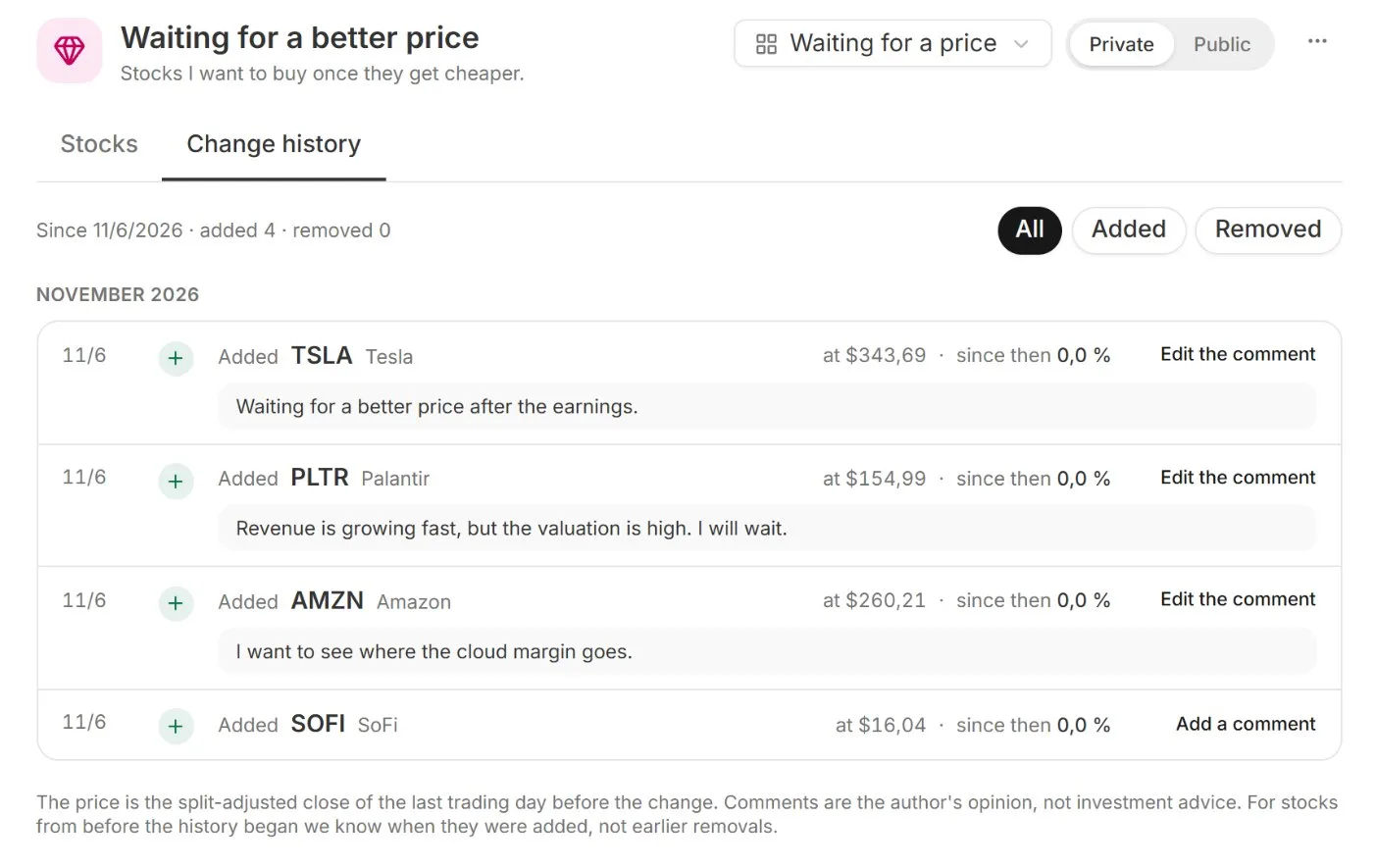
Change history: date, price, movement since then, and your comment on each change.
On your phone just like on your computer
On your phone, watchlist cards appear one below another. Switch between lists using the tabs at the top, and the table turns into stock cards. Views, cards above the list, and change history work just as they do on a computer.
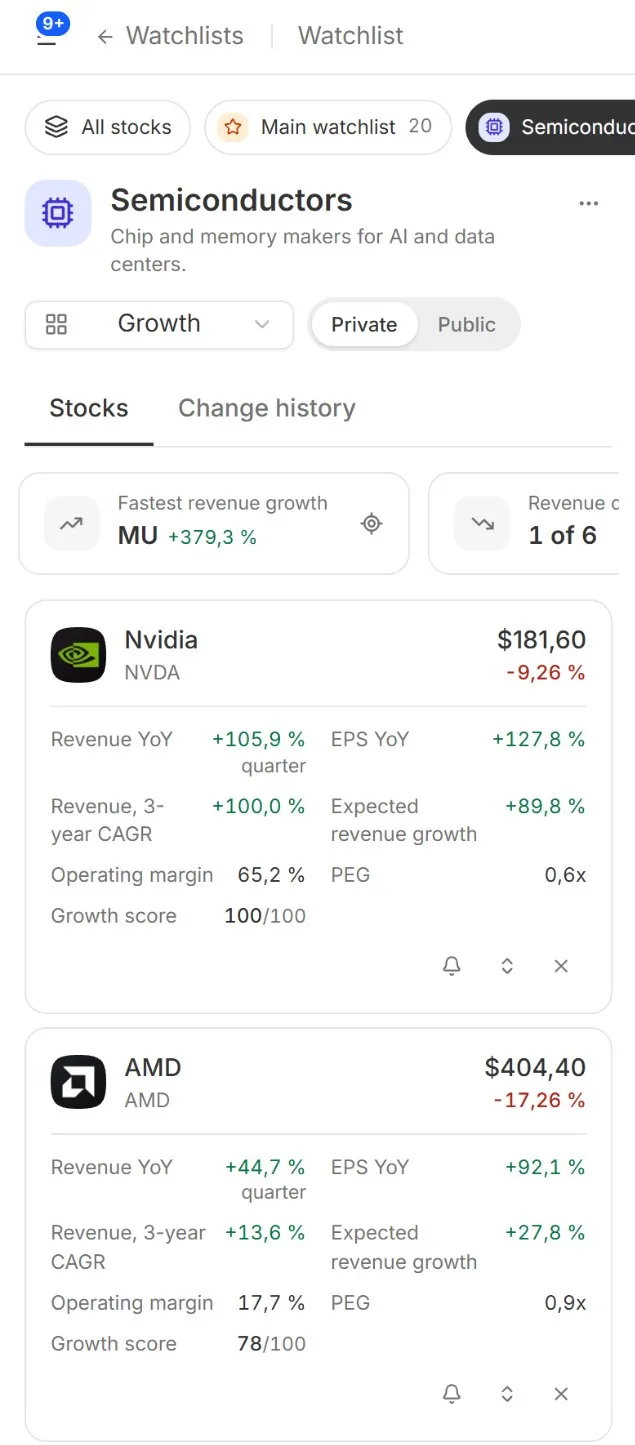
Semiconductors watchlist on a phone in the Growth view: list tabs, cards above the list, and stocks displayed as cards.
How to get started
1. Open bulios.com and click Watchlists in the left-hand menu.
2. Click the New watchlist card, name it, and choose an icon and color.
3. Click Follow on a stock and select the lists it belongs in. Stocks you already follow are in your main watchlist, and you can sort them into new lists using the same button.
4. Choose the View that suits the list, then add comments to changes in the Change History tab.
Get your followed stocks organized
Multiple watchlists, eleven views, and change history for every list.
Find new stocks for your lists in the Stock Screener and IPO Calendar.